How Do I Copy the TV2chart to a Computer?
The TV2 logs a lot of data, which can be backed up or copied to a computer at any time with the PC software (TView) supplied by 2di. A regular schedule for downloading data should be established so that on a periodic basis, say - once every six months, data is uploaded to a computer for archiving, if the TView software is not set to automatically copy the data to your computer.
The TV2 can be unplugged from the wall power adapter and the power cord and the USB cable plugged into a USB port on any computer. If the TV2 is plugged into a computer with the USB cable the TV2 will be powered by the comptuer.
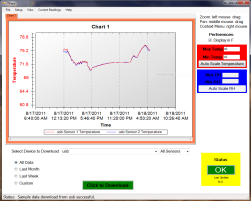
Temperature graph on the PC.
Once your data is downloaded to a PC with the TView program you can print a copy of your chart. We recommend that you always print your chars to a color printer since the multiple lines that might be present from multiple sensors will be hard to distinguish is you print them all in black. A picture of a PDF of a chart that has been downloaded and printed.
Current Status
With the (TView) software you can also see the current status of any TV2 all the time. For this function to work the TV2 must be talking to a computer running TView.

A chart of real-time data from two sensors
Auto Download
The TView program can automatically download data from the TV2 to your computer at regular intervals so you are constantly archiving data. In this mode a file is written to your computer and then newly collected data is appended to the file every few seconds. Since this file keeps getting larger all the time a new file is started at the beginning of each calendar month. These archival files are proceeded with the year and month.
For alternate ways to access data stored in the
TV2 see:
Archiving and Printing Data from
the TV2